

Data validation, sometimes called CRM data verification, is a process for ensuring that database entries are both meaningful and correct. In other words, data validation helps prevent wrong information from being entered into a database, including a CRM system database.
Because of CRM’s role in an organization, some types of CRM data validation can increase revenue.

What is Data Validation?
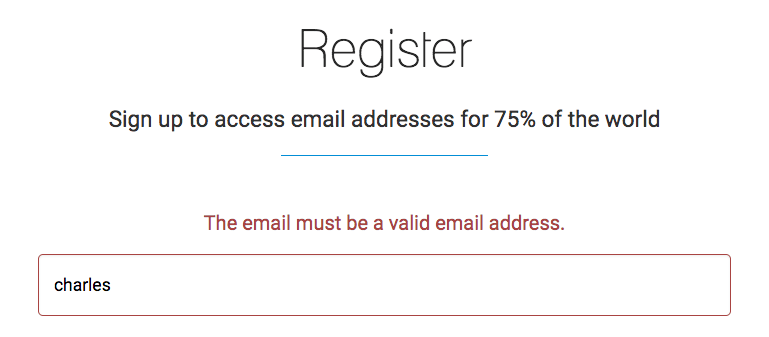
A typical example of data validation exists on almost every online signup or registration form. That is, a valid email address is required:
A drop-down list is a data entry control often used with data validation rules. A field or cell value must be selected from a predefined list.
Most CRM systems have some built-in data validation. One example is requiring a properly formatted email address, similar to a public-facing form.
However, not all CRM systems allow an administrator to add custom validation rules. The ability to add specific rules may be a part of your CRM requirements framework.
Applying specific data validation logic that aligns with your company’s business processes helps ensure the overall success of your CRM implementation. Benefits include
- More meaningful reports
- Higher system adoption
- Improved customer service
- Increased revenue (examples below)
Here are twelve examples of data validation rules to strengthen your CRM data verification.
Examples of Custom CRM Validation Logic
Enforce a two-character U.S. state or Canadian province abbreviations – Display an error message if “Mass” is entered for Massachusetts rather than “MA,” for example.
Ensure that all ten digits of U.S. or Canadian phone numbers are entered – Prevent users from taking shortcuts and entering only the seven-digit portion of a telephone number within their area code.
Require proper formatting of an Employer Identification Number – Ensure that an EIN is entered in the XX-XXXXXXX format.
Require a reason for lost opportunities – If a sales opportunity was lost, the salesperson must enter why it was lost. “Why we lose deals” is valuable information for marketing and sales management.
An opportunity close date must be in the future – Prevent a salesperson from entering an opportunity close date that’s in the past. If a salesperson edits an opportunity with a past close date, require them to update the close date to a future date.
Allow only the record owner to change specific fields in a record – Specify fields within a record that can only be edited by the owner of that record.
Disallow discounts over a certain percentage – Display an error message if the discount added to a product line item exceeds a specified discount limit.
Ensure that a billable task includes the time spent – If a task is billable, time spent on it must be added before completion.
Require a valid postal or ZIP code format – Check that U.S. ZIP codes follow the five-digit or ZIP+4 pattern and that Canadian postal codes match the A1A 1A1 layout.
Reject a date of birth set in the future – If someone enters a birthdate later than today, block the save and prompt them to fix it.
Keep win probability between 0 and 100 percent – Stop users from entering an opportunity probability outside that range so your forecasts stay believable.
Require a next step when a deal reaches negotiation – When the stage changes to negotiation, the rep must fill in the next step before the record will save.
Data Validation Capabilities of CRM Vendors
Here are some of the CRM vendors that allow for customized validation rules:
Zoho
Zoho allows users to create a wide range of custom validation rules. Users can create rules with conditional logic (if A then B) and set alerts when conditions are met or not.
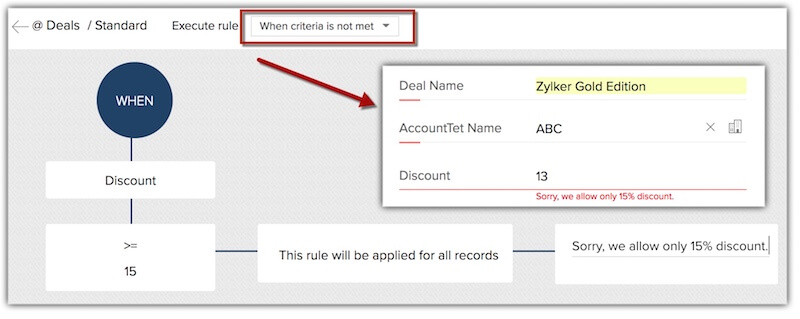
Zoho provides a detailed overview of how its data validation system works on its website.
Microsoft
Creating data validation rules in Microsoft Dynamics 365 takes a little more setup than in some other CRM solutions. Admins typically build them with business rules, layering on Power Automate flows for more advanced checks.
For more information about how this is done, see Microsoft’s guide to business rules.
Creatio
Basic data validation is possible in Creatio, but it is not an out-of-the-box feature. Enabling it requires users to modify some default settings and add code in Creatio.
Creatio documents the steps in its Academy documentation, though the work sits on the developer side of the platform.
Salesforce
Salesforce allows users to create custom data validation rules using formulas. Users can specify custom error messages when validation fails.
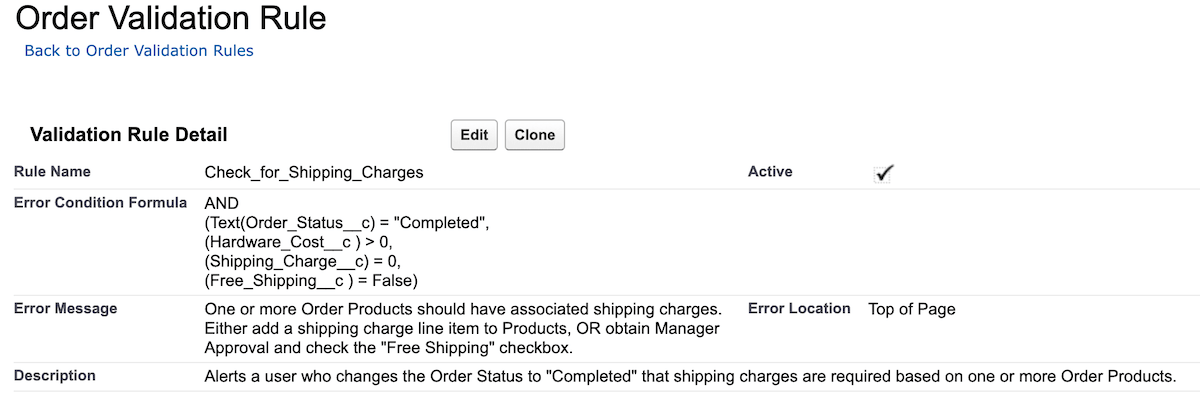
Here is a deep dive into Salesforce validation rules.
HubSpot
HubSpot launched validation rules as a public beta in 2022, and they are now available across its plans. See HubSpot’s documentation for the full set of options.
Data validation is an essential part of any CRM system. Businesses can improve efficiency, productivity, and decision-making by ensuring consistent data quality.
The examples of CRM data validation rules discussed in this blog post provide a starting point for businesses looking to strengthen their CRM data verification practices.
FAQs
CRM data validation, also called CRM data verification, is a process that ensures database entries are both meaningful and correct. It helps prevent wrong or improperly formatted information from being entered into a CRM system.
Applying specific data validation logic aligns your CRM with company business processes. Benefits include more meaningful reports, higher system adoption, improved customer service, and increased revenue.
Common examples include enforcing two-character state abbreviations, ensuring a full 10-digit phone number is entered, requiring a reason for lost opportunities, keeping win probabilities between 0 and 100 percent, and disallowing discounts over a specified percentage.
While most CRM systems have some built-in data validation, such as requiring properly formatted email addresses, not all allow administrators to create custom validation rules. This capability should be evaluated as part of your CRM requirements framework.
Major CRM vendors like Zoho, Salesforce, Microsoft Dynamics 365, and HubSpot all offer options for creating custom validation rules. These range from straightforward formula-based rules to more advanced setups that require business rules or workflows.