

Data quality in CRM is not just a technical issue — it’s proper business process definition and user adherence to agreed-upon standards.
Erroneous and incomplete CRM and other enterprise data cost time and money.
Accurate data can help secure new business and retain existing customers. It makes AI-driven analysis and responses more actionable.
Another form of data quality is architectural — did the CRM implementation team set up the system to collect the types of information that will result in highly informed users and managers?
Striving for a gold-standard approach to prospect, customer, vendor, and other data always pays off. It adds value to the CRM system.
A survey conducted by Validity found that 31% of respondents estimated their company loses over 20% of annual revenue due to poor CRM data quality.
The same survey found that missing or incomplete data was the most significant impediment to respondents’ full use of their CRM systems.
Many organizations start with a pristine new CRM instance. But before long, CRM data decay sets in.
Human input, autonomous CRM input, data imports, and data feeds all contribute to the problem.
Considering data quality from the outset of the CRM planning implementation process is crucial.
Your organization will benefit from a proactive approach to data integrity and quality rather than a reactive one.
Who’s in Charge of an Organization’s Data Management?
From a governance perspective, someone must be responsible for data quality and integrity.
Even with ‘self-driving’ AI-native CRM, data won’t fully take care of itself if no one is responsible for quality oversight.
CRM project managers need to anticipate potential causes of poor data quality and design the system to address them.
Examples of Data Decay
Here are a few examples of how data quality issues can quickly arise.
Duplicate Records
Record duplication is one of the most common data quality (DQ) issues in CRM.
There is often cross-table duplication. A person is a Lead and a Contact, or a Lead and multiple Contacts.

While technical rules in CRM can help reduce duplicate creation, users also have a responsibility to check for existing records before creating new ones.
Obsolete Data
Appending ‘LEFT THE COMPANY’ to a Contact’s last name is not a quality approach for flagging a customer’s ex-employee.
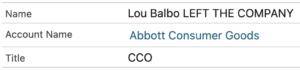
There should be a structured process for flagging defunct organizations and former employees.
This can be as simple as training CRM users to select the ‘Inactive’ picklist value for obsolete accounts and contact records.
Global Accounts
Often, there is no plan in place to manage global accounts across regional offices. For example, should every region have its own CRM account record in the format ‘Company Name – Region’?
Left to their own devices, users will collectively develop a hybrid of global account records—for some companies, there is one Account for the entire world, and for others, there are multiple Accounts.
Superfluous Records
AI-native CRM systems that auto-create Accounts and Contacts from email activity may create records that don’t belong in a CRM system, such as those for certain vendors.
Picklist, a.k.a. Dropdown, Values
No one has ever requested a report of all customers in the ‘Other’ industry, or all Leads with a source of ‘Other.’
List values should include all reasonable possibilities.
Values should be periodically assessed and updated in response to changes in product and service offerings or the target audience.
Unverified Email Addresses
Invalid email addresses are a common issue in mass list imports.
A domain’s sender reputation can be diminished when too many emails bounce.
Coupled with incomplete segmentation data, this issue can delay marketing campaigns.
Unstructured Customer Data
Freeform short and long text fields in a CRM system are okay for specific purposes.
However, searching and reporting are less effective when unstructured data fields are used for data that could be better maintained in structured data fields.
Users’ Creativity Leading to Errors
CRM users are sometimes very creative with data entry. For example, they’ll enter two phone numbers into a ‘phone’ field and label each.
Data fabrication can also occur. Users who don’t have the necessary information to complete a required field will make something up.
Predicted Opportunity close dates are perhaps a CRM system’s greatest works of data fiction.
Strategies for Maintaining CRM Data Quality
For IT Project Managers, the following strategies are essential for preventing data decay and maximizing the value of CRM data to users and management.
CRM System Configuration and Customization
Your CRM system must be designed to minimize the likelihood of data errors and ambiguity.
This means thinking through the implications of each added field.
Implement Validation Rules
Validation rules are essential for preventing erroneous data entry in specific fields.
Validation is essential and warrants examining each CRM vendor’s capabilities during the CRM selection process.
Configure Duplicate Rules Properly
Duplicate prevention is proactive. Deduplication is reactive.
If your CRM system has comprehensive duplicate-avoidance features, ensure that the rules and actions are correctly configured.
Use a Data Cleansing AI Agent
There are AI agent providers specific to certain CRM systems for handling large-scale data issues.
This is a solid option for organizations with large CRM databases that have accumulated years of issues. Plus, an AI agent can keep working in the background and become a preventive tool.
Train Users
Despite all the ways technology can prevent CRM data decay, there is a level of user responsibility for maintaining a gold-standard data.
Users must be trained and periodically retrained to consistently create and update CRM records.
Communicating the ‘why’ of specific fields is essential, as users may initially not see the value.
Due to the IKEA effect, users who contributed to the system before its implementation may be more compliant with data entry standards.
As for those fictional Opportunity close dates, they typically need to be updated during sales meetings.
The quality and integrity of an organization’s CRM data can be a significant competitive advantage.
IT Project Managers must prioritize this aspect of CRM to maximize project success.