
Realizing CRM value beyond its total cost is crucial. Otherwise, why bother investing in CRM?
Most lists of CRM benefits stop at the sales team: a cleaner pipeline, sharper forecasts, more deals closed. Those benefits are real, but every vendor already promises them.
CRM’s bigger value shows up across the whole company. A well-implemented CRM preserves what departing employees know, connects sales with engineering, operations, and finance, speeds up customer service, grows existing accounts, puts the right content in front of sellers, and can even run processes unrelated to sales.
Finding that value means identifying where CRM can deliver results in your organization, ultimately increasing customer loyalty and retention. It requires domain experience, in-depth internal conversations, and creativity.
Below are seven areas where we, as independent CRM consultants, have helped clients get value from CRM beyond the common reasons for making the investment, along with what to set up and how to tell whether it’s working.
Key takeaways
- The standard CRM benefits, such as centralized data, automation, and reporting, are table stakes. The larger returns come from using CRM beyond the sales team.
- Seven areas are often overlooked: corporate memory, collaborative selling, post-sales handoffs, customer service, share of wallet, sales enablement, and xRM.
- When a CRM underdelivers, the cause is usually a narrow scope, low adoption, or poor data, not the software.
- Decide how you’ll measure each benefit before you buy, and record a baseline before go-live.
In this article
- The CRM benefits everyone already knows
- 7 overlooked ways a CRM creates company-wide value
- Why companies struggle to get value from CRM
- How to measure the value your CRM creates
- Frequently asked questions
The CRM Benefits Everyone Already Knows
Any CRM worth buying delivers a familiar set of benefits:
- One source of customer truth. Contacts, accounts, activities, and history live in one shared database instead of spreadsheets and inboxes.
- Automation. Follow-up tasks, lead assignment, and email sequences run without anyone having to remember to start them.
- Reporting and forecasting. Leaders can see what’s in the pipeline, where deals stall, and what’s likely to close.
- Better retention. Tracked follow-ups mean fewer customers fall through the cracks.
- Security and compliance. Role-based access controls determine who can see and change customer data, which supports privacy obligations.
- Integration and scale. CRM connects to email, calendars, marketing, and accounting tools, and grows with the team.
These are table stakes. They justify buying a CRM, but they rarely justify the full cost of owning one for years. The rest of this article focuses on where the additional value comes from.
7 Overlooked Ways a CRM Creates Company-Wide Value
The table below summarizes each area. The sections that follow explain how it works in practice.
| Benefit | Teams that gain | What to set up | How to measure it |
|---|---|---|---|
| 1. Corporate memory | Everyone, especially when people leave | Required activity logging, account notes, relationship maps | Time for a new owner to get productive on an inherited account |
| 2. Collaborative selling | Sales, engineering, design, manufacturing | Shared opportunity teams, tasks, and discussion on the deal record | Quote turnaround time, sales cycle length |
| 3. Post-sales handoffs | Sales, operations, finance | Sales orders between opportunity and invoice, lead source tracking | Order errors, days from closed-won to invoice |
| 4. Customer service | Service, support, field technicians | Case management, multichannel support, AI agents grounded in your knowledge base | First-response and resolution time |
| 5. Share of wallet | Account managers, sales leaders | Whitespace analysis, QBR cadence, account maps | Revenue and product lines per key account |
| 6. Sales enablement | Sellers, marketing | Content library organized by selling motion, nurture sequences | Content used in won deals, win rate |
| 7. xRM | Any department running a manual process | Custom tables or marketplace packages | Spreadsheets and point tools retired, hours saved |
1. Preserve Corporate Memory When People Leave
Corporate memory (a.k.a. institutional memory) is the combined knowledge, experience, and insights vital to business success.
Businesses face risk when key employees leave or roles shift, potentially losing critical customer relationship information and operational insights. The exposure is large: a 2018 Panopto survey, reported by HR Dive, found that 42% of institutional knowledge sits with individual employees and isn’t shared with coworkers.
CRM software helps protect and centralize this corporate memory by capturing customer interactions, deal histories, and internal knowledge.
Picture a long-tenured account manager retiring. The person who inherits the account should be able to open one record and see who the decision-makers are, what was promised at the last renewal, and why the customer nearly left a few years ago. Without CRM, that knowledge walks out the door when the employee leaves.
This approach ensures continuity, supports informed decision-making, and improves customer experiences by giving teams a consistent, shared understanding of company relationships and practices.
How to measure it: how long a new owner takes to get productive on an inherited account, and how many accounts you keep after a rep leaves.
2. Speed Up Collaborative Selling Across Teams
Collaborative selling is essential for companies that offer technical, customized, or complex solutions. This approach involves coordinated efforts from sales, engineering, design, and manufacturing teams to develop tailored solutions that meet customer needs.
However, disparate systems can lead to miscommunication and delays. It’s a common problem: the average enterprise now runs 897 applications, and only 29% are integrated, according to MuleSoft’s 2025 Connectivity Benchmark of more than 1,050 IT leaders.
A CRM system centralizes information, streamlines task assignments, and improves accountability. With CRM, teams gain real-time visibility into deal statuses, facilitate seamless pricing and negotiation discussions, and leverage internal networks to unlock new opportunities.
For manufacturers and distributors, that might mean an engineer reviewing specifications on the opportunity record instead of in a forwarded email chain, while the salesperson sees exactly where the quote stands.
This integrated approach accelerates sales cycles, fosters stronger customer trust, and drives revenue growth.
How to measure it: quote turnaround time and average sales cycle length for complex deals.
3. Streamline Post-Sales Handoffs to Operations and Finance
A CRM system enhances post-sales processes by serving as an intermediary between opportunities and invoices. This integration facilitates smoother handoffs from sales to operations and finance, creating a more seamless customer experience.
Sales orders provide the customer and revenue operations teams with the detailed information needed for effective customer interactions, allowing the addition of products or services without salesperson involvement.
They also streamline the transition to invoicing by bridging the gap, improving internal efficiency. When quotes are built in CRM with configure, price, quote (CPQ) tools, the order that reaches operations matches what the customer actually agreed to.
Attribute Revenue Back to Marketing
Tracking lead sources through to orders enables more accurate ROI calculations by attributing long-term revenue to specific sources. Instead of crediting a trade show with only the first deal it produced, you can see every order that customer placed in the years that followed.
How to measure it: order errors, days from closed-won to first invoice, and revenue by original lead source.
4. Resolve Customer Issues Faster With Case Management
Implementing a CRM system’s native ticketing, or case management, is often an afterthought.
Customer service and technical support functionality often remain locked in a separate point solution after a new sales and marketing system goes live. That leaves service agents without the sales history, and salespeople walking into renewals unaware of open issues.
However, most CRM platforms can now be configured to support customers across multiple communication channels, including email, chat, phone, and a self-service customer portal.
AI Agents Need Your Service History
AI agents can now answer specific customer questions with accurate, internally sourced information, drawing on the same knowledge base articles and case history your team already maintains. Gartner expects agentic AI to handle 80% of common customer service issues on its own, with no human involved, by 2029 (prediction published March 2025).
Those agents are only as good as the data behind them, which is a strong argument for keeping service inside the CRM rather than in a separate system.
Field Service for Equipment Manufacturers
Equipment manufacturers can leverage field service management within CRM: scheduling technicians, tracking installed equipment, and giving the technician the customer’s full history before arriving on site. The service visit then feeds back into the account record, where sales can see it.
Service needs like these should be part of an up-front requirements-gathering exercise. B2B and B2C service also work differently, so design for the customers you actually have.
How to measure it: first-response time, time to resolution, and the share of issues customers resolve without an agent.
5. Increase Customers’ Share of Wallet in Key Accounts
A well-implemented CRM system empowers sales leaders to strategically grow customer wallet share, especially in major accounts that currently split spending between their company and competitors.
Find the Whitespace
By leveraging CRM insights, teams can identify whitespace, uncover untapped opportunities, and proactively expand relationships across multiple divisions or programs within key accounts.
Run Regular Business Reviews
CRM can support regular Quarterly Business Reviews (QBRs), ensuring ongoing engagement and accurate tracking of evolving customer needs.
Map the Account
Account mapping helps sales teams navigate complex organizational structures, identify key decision-makers, and quickly capitalize on emerging opportunities.
This ultimately increases customer share of wallet and fortifies a company’s position as a trusted partner with top-tier clients.
How to measure it: revenue per key account, the number of divisions or product lines each account buys, and how consistently QBRs actually happen.
6. Give Sellers the Right Content at the Right Moment
CRM systems can significantly boost B2B sales enablement by giving sales teams quick access to relevant content and resources when they need it.
Sellers often struggle to locate essential sales tools, such as brochures, videos, email templates, and slide decks, which prolong sales cycles and reduce win rates. Their selling time is already scarce. In Salesforce’s 2026 State of Sales report, a survey of more than 4,000 sales professionals found that the average seller spent only 40% of their time actually selling, and sellers outside Gen Z named limited access to data and insights as their biggest enablement obstacle.
A well-designed CRM system can centralize these resources, categorize them by selling motion, and streamline content delivery.
Additionally, CRM can automatically add prospects to targeted nurture sequences, further accelerating deal progression.
Using a CRM for sales enablement helps sales leaders empower their teams, shorten sales cycles, and maximize their CRM investment.
How to measure it: which content gets used in won deals, win rate, and sales cycle length.
7. Extend CRM Company-Wide With an xRM Strategy
Even small businesses sometimes invest in an enterprise-grade CRM system to extend the platform beyond sales, marketing, and customer service.
xRM (Extended Relationship Management) typically involves customizing the CRM database and front end to address specific business needs that currently involve manual processes or disjointed systems.
An interesting illustrative example of custom xRM is a local seeing-eye dog organization. It has a custom canine table and interrelationships between tables within its CRM system.
It can track various data points and activities for dogs, from birth to puppy raising, training, person assignment, and retirement. You won’t find this capability in a CRM vendor’s marketing literature.
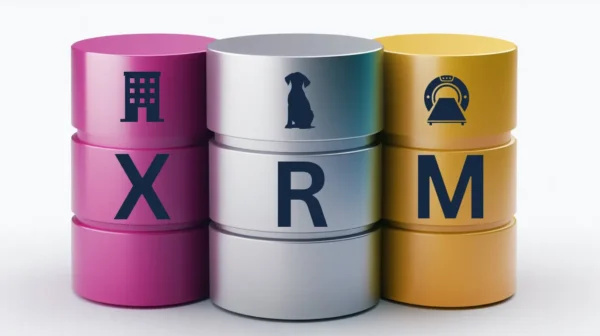
A more mainstream example is a real estate company that tracks properties or buildings as entities in its CRM system. Another example is a medical device company that stores field assets in a custom table.
xRM can also mean purchasing a pre-developed package from a CRM vendor’s third-party marketplace. Larger CRM vendors have extensive partner ecosystems that develop packages that integrate easily into their platforms.
The tradeoff is fit versus effort. Custom tables match your process exactly but require maintenance. Marketplace packages deploy faster but ask you to adapt your process to theirs.
How to measure it: retired spreadsheets and point solutions, and staff hours saved on the process you moved into CRM.
Why Companies Struggle to Get Value From CRM
When clients tell us their CRM isn’t delivering, the software is rarely the root cause. The same five problems come up again and again:
- The scope stops at sales. If the CRM serves only sellers, every other department keeps its own spreadsheet, and the company pays for a system that sees a fraction of each customer relationship.
- People don’t use it. Users skip systems that slow them down, so CRM usability deserves as much attention as features.
- The data can’t be trusted. In the same 2026 State of Sales research, 74% of sales professionals said they focused on data cleansing, and 51% of sales leaders using AI said disconnected systems slowed their AI initiatives. Validation rules stop bad data at the door.
- Nobody owns it. A CRM without a dedicated CRM administrator slowly drifts out of step with how the business actually works.
- The requirements came after the purchase. Buying first and deciding what the system should do later means you’ll have to retrofit. A CRM readiness checklist helps you avoid that.
None of these are technology problems, which is good news: you can fix them without switching platforms.
How to Measure the Value Your CRM Creates
A CRM rarely makes money directly. It makes money by shortening sales cycles, raising win rates, and growing existing accounts, and it saves money by cutting rework, manual handoffs, and duplicate tools. Measuring that comes down to four steps:
- Add up the full cost. Licenses are only part of it. Include implementation, integrations, administration, and training. Our CRM cost calculator covers the main line items.
- Pick one metric per benefit. Use the “how to measure it” line in each section above as a starting point, and track only the benefits you’re actually pursuing.
- Record a baseline before go-live. Capture each metric before the new system or process launches. Without a baseline, improvement is a matter of opinion.
- Review quarterly. Compare results against cost, and fix or drop initiatives that aren’t moving the needle.
You’ll often see one industry figure quoted: Nucleus Research reported in 2014 that CRM returned $8.71 for every dollar spent, based on its CRM ROI case studies. It’s a useful signal that well-run CRM pays off, but it’s more than a decade old and drawn from success stories. Your own baseline is a better guide.
Frequently Asked Questions
What is the value of a CRM?
A CRM’s value is the business result it produces beyond its cost: more revenue from new and existing customers, lower operating costs, and less risk when people leave. The standard benefits come from organizing sales. The larger value comes from extending CRM to service, operations, finance, and other departments.
What is the ROI of a CRM?
It depends on what you use it for and how well you adopt it. The most-quoted benchmark, $8.71 returned per dollar spent, comes from a 2014 Nucleus Research analysis. A more reliable number is your own: total cost of ownership measured against baselined metrics such as win rate, sales cycle length, and account growth.
What are the pros and cons of using a CRM?
The pros include a single source of customer data, automated routine work, better visibility for leaders, and the company-wide benefits described above. The cons include total cost of ownership, implementation effort, the risk of low adoption, and the ongoing work of keeping data clean.
Will AI replace CRM?
Unlikely. AI agents need the customer records, interaction history, and permissions a CRM holds to act accurately. Salesforce made the same point in its 2026 State of Sales research: agents without full customer context tend to fail. In practice, AI is becoming a layer on top of CRM, and it raises the stakes on data quality rather than making the system unnecessary.
What’s the fastest way to get value from CRM after go-live?
Pick one high-friction process outside of core sales, such as the handoff from sales to operations, move it into CRM, and measure the result. Have leaders run pipeline and account reviews from CRM dashboards rather than side spreadsheets, which signals to everyone that the system is the source of truth.
What is xRM?
xRM, or Extended Relationship Management, means using a CRM platform to manage relationships and records beyond customers, such as properties, medical devices, vendors, or even guide dogs. It’s done with custom tables or prebuilt marketplace packages.
Plan for Value Before You Buy
Creating additional business value with CRM often means thinking outside the box and asking the right questions.
Ideally, do this before a major cash outlay for the supporting technology, so you don’t have to change the wheels while the bus is moving.
If you’re scoping a new CRM or trying to get more from the one you have, start with the five levels of CRM requirements or our example CRM requirements document.